Overview
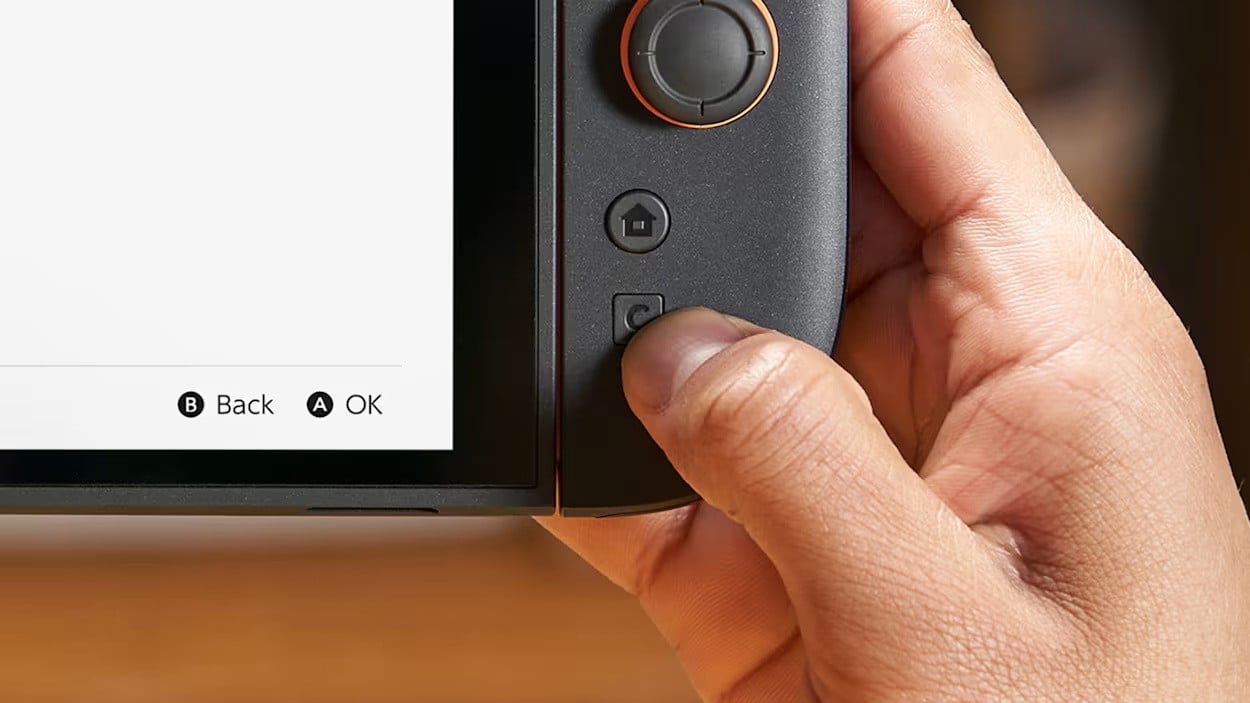
The Switch 2 GameChat setup is a practical piece of hardware design rather than a vague online add-on. Nintendo gave the system a prominently placed physical GameChat button, often called the C-Button, and used it to make the feature feel immediate: press, connect, talk. That matters because the button is not just branding. It is the literal entry point into a feature Nintendo wanted players to notice, use, and, during the launch period, try with less friction.
There is also an interesting development story behind it. Nintendo reportedly tested GameChat with a special prototype based on the original Nintendo Switch development kit, not with a Switch 2 prototype in the usual sense. That detail says a lot about how hardware teams build and refine interaction before the final consumer machine is ready. The body of the system changed, the idea stayed the same. And in a field where small interface choices can decide whether social features thrive or gather dust, that is the whole game.
If you are following Switch 2 GameChat timing and access news, the useful thing to keep in mind is simple: Nintendo treated GameChat as something to be discovered through use, not merely read about in a menu. That's the texture of it.
How Nintendo built and tested the feature
The confirmed fact that Nintendo used a special prototype based on the original Switch development kit is more than trivia. It suggests a development process focused on interface behavior, button placement, and the feel of the feature rather than on the final industrial design alone. In other words, the team was testing how GameChat would live in the hands of players, how quickly it could be reached, and whether the button itself did the job of inviting use.
For anyone interested in the language around hardware testing, this is a good place to notice terms like prototipo, a test version built for internal evaluation, and 予約 (yoyaku, reservation; booking), which means reservation or booking when used in consumer contexts. Nintendo’s launch planning often follows a very disciplined path: design, limit access, then widen it through an offer or service window. Very Japanese, in the quiet administrative sense. Not glamorous. Effective.
The C-Button and how GameChat is meant to work
The GameChat feature is tied to a physical button placed prominently on the console, and Nintendo’s own naming around the C-Button keeps the function front and center. That matters because hardware shortcuts change behavior. A feature buried in software is easy to forget; a button you can feel with your thumb becomes part of the body of the machine. You do not have to hunt through layers of menus, which is exactly the point.
During the Welcome Offer period, Nintendo tied rewards to using GameChat, including avatar items, themes, and My Nintendo points as examples in the coverage. That is a classic nudge. It gives players a reason to press the button, explore the feature, and see whether it fits their habits. In Japan, this kind of incentive structure sits comfortably beside the broader culture of 手前 (temae, polished public appearance; outward social manner), the presented social face of a service or system, where ease and polish often matter as much as the underlying tool.
For people who like seeing how platform design and communication intersect, the feature also fits neatly into the wider conversation around the GameChat button’s visible role on Switch 2. The hardware is doing public relations work. Quietly, but unmistakably.
What the Welcome Offer actually did
Nintendo ran a GameChat Welcome Offer at the Switch 2 launch that gave new users a limited-time free trial of GameChat. The offer was automatically applied to eligible Nintendo Account IDs created or linked on a Switch 2 during the launch window, according to the reported coverage, though that account detail should be treated carefully if you are comparing regional messaging or timing. The broad point is clear: Nintendo used the launch period to reduce the barrier to first use.
The reported end date was March 31, 2026 at 23:59 UTC, not April 14, 2026. That distinction matters for anyone tracking service availability or trying to understand when promotional access closed. Free-trial windows often vanish with little ceremony. One day the offer exists, the next day it does not. More soon, as these things go.
If you are using this as a practical guide, the key takeaway is that promotional access and feature access are not the same thing. The offer helped people sample GameChat. It did not define the feature itself.
Why this feature matters for Switch 2
GameChat is important because it gives Switch 2 a more visible social layer without making that layer feel abstract. The console does not merely support conversation; it foregrounds it. That is a stronger statement than a lot of people notice at first glance. A button placed where your hand naturally lands changes the emotional geography of the machine. It says: this is part of the experience, not an afterthought.
For Nintendo, the launch-period reward structure was also a sensible way to encourage experimentation. People are more likely to test a feature when there is a clear reason to do so, even if the reward is modest. Avatar items, themes, and points are small things. Small things work. They are the pebbles on the path.
- The physical C-Button makes GameChat easy to find and use.
- The Welcome Offer lowered friction for first-time users.
- Rewards helped turn a social feature into a habit.
- The prototype story shows how early Nintendo was thinking about usability.
Related systems and services to keep an eye on
If you are tracing the broader pattern, GameChat sits alongside the usual Nintendo account ecosystem, reward programs, and launch-window incentives that shape how players adopt new features. That makes it useful to compare with other platform-level services rather than only with games. The real subject here is not software alone, but how Nintendo stages interaction around hardware, account identity, and incentives.
This is also where a bit of kanji curiosity can sneak in usefully for learners, even though the body of the feature is about buttons and services rather than text study. If you are looking for the phrase nintendo switch 2 gamechat button kanji or nintendo switch 2 gamechat button japanisch lernen, the practical angle is simple: learn the vocabulary around menus, settings, offers, and account status, because that is where the feature lives. The machine will not teach you politely. You have to meet it halfway.
Where to experience it in Japan
If you want to encounter GameChat in a real-world Japanese context, the place to start is a Nintendo retail space or a large electronics store with Switch 2 display units, where console features are often shown in a hands-on setup. In Japan, these stores are built for comparison and quick experimentation: you can see the button layout, check how the interface is presented, and ask staff about account setup or service availability. That is the most concrete way to experience a hardware feature like this outside your own home.
Look for stores that carry Nintendo demo stations, especially in major urban shopping districts, and ask whether the Switch 2 unit on display includes the GameChat button and feature explanation. The Japanese phrase おもてなし (omotenashi, hospitality; attentive customer care), meaning attentive hospitality, applies here in a practical retail sense: staff will often help, but only if you ask the right question and keep it brief. Bring your own curiosity, not a script.
For learners, the useful reading strategy is to focus on service labels, promotional language, and the button names themselves. A feature like this is excellent for building real-world vocabulary because it sits at the intersection of hardware, account management, and social communication. The system language is not decoration. It is the thing.
Frequently Asked Questions
What is the Switch 2 GameChat button?
It is the prominently placed physical button, often called the C-Button, that launches or highlights GameChat on Switch 2.
Did Nintendo test GameChat on a Switch 2 prototype?
No. The reported testing used a special prototype based on the original Nintendo Switch development kit, not a Switch 2 prototype.
When did the GameChat Welcome Offer end?
The reported end date was March 31, 2026 at 23:59 UTC.
What kinds of rewards were tied to GameChat use?
Coverage mentioned avatar items, themes, and My Nintendo points as examples of launch-period rewards.
Where can I experience Switch 2 GameChat in Japan?
The most practical places are Nintendo retail spaces and major electronics stores with Switch 2 demo units, where you can see the button layout and ask about service access.